Best Pocket WiFi in Japan (2026): Which Plan to Rent, Where to Pick Up & How to Return
Updated September 2026
If you have already decided that a pocket WiFi router is the right way to get online in Japan, the remaining questions are practical ones: which plan actually suits your trip, where you collect the device after you land, and what happens if your flight arrives late. This page answers those three questions using CDJapan Rental's own plans and our own airport pickup network. It does not compare providers — if you want the raw numbers across the market, there is a link to our price comparison page at the end.
The short version
- Travelling alone, mostly maps, messaging and light browsing? The 100GB/month SoftBank plan is the cheapest option and 100GB is more data than most solo travellers use in a month.
- Two or more people sharing, or streaming and tethering a laptop? Take one of the two unlimited plans so you never have to ration data.
- Staying mainly in Tokyo, Osaka and other large cities and you want the fastest speeds? WiMAX 5G Unlimited.
- Travelling into rural areas, mountains or islands, or you want the smaller, longer-lasting device? SoftBank Unlimited.
- Booking ten or more units for a company trip? See Corporate & group rentals below.
How to choose a pocket WiFi in Japan
Three things actually change your experience. Everything else is detail.
1. How much data you get, and what happens when you run out
Rental WiFi plans come in two broad shapes. Some give you a monthly data allowance; others are genuinely uncapped. The word "unlimited" is used loosely across the rental category, so the thing worth reading on any plan you are considering — ours or anyone else's — is the written fair-use clause. Two questions answer it: is there a daily or rolling multi-day threshold in addition to the headline figure, and what speed applies once you cross it?
Speed restriction after a threshold is a normal part of how mobile networks manage capacity, and it is not inherently a problem. It only becomes one when the threshold is low enough that ordinary use reaches it — a few hours of video, or a large phone backup over WiFi, can consume several gigabytes in an afternoon.
For our own plans, the position is straightforward:
- SoftBank 100GB/Month — a monthly allowance. If usage passes 100GB inside a month, speeds are restricted, with a minimum of 256Kbps. There is no daily cap on top of that.
- SoftBank Unlimited and WiMAX 5G Unlimited — no data cap and no daily threshold.
Across more than 10,000 rentals we have not received a speed-restriction report from a customer on normal usage. That is our order record rather than a guarantee about network conditions on any given day, but it is the honest answer to the question people usually mean when they ask whether unlimited is really unlimited.
2. Where and when you can actually collect the device
This is the part most travellers underestimate, and it is where an otherwise good plan goes wrong. A rental you cannot collect at 23:40 on a Sunday is not a cheap rental. Before you book, check the closing time of your collection point against your scheduled landing time — not your departure time, and not the flight's official arrival time alone, because immigration and baggage reclaim at Narita and Haneda routinely take 45 to 90 minutes.
Our full pickup and return mechanics, including the exact counter hours and the cut-off after which you should switch to hotel delivery, are in the pickup and return section.
3. Support while you are actually in Japan
Devices occasionally fail to connect, and travellers occasionally lose chargers. What matters is whether you can reach someone in English during Japanese business hours and get a replacement or an answer without a phone call to an overseas call centre. We handle support in English from Japan, and the same team that processes your order handles problems during the rental.
Which CDJapan plan fits your trip
We keep three short-term plans. They are deliberately few — the differences between them are real, and each one is the clear answer for a particular kind of trip.
| Plan | Network | Data | Device | Best for |
|---|---|---|---|---|
| SoftBank Pocket WiFi 100GB/Month | SoftBank 4G LTE | 100GB per month, then restricted (minimum 256Kbps) | Compact, long battery life | Solo travellers and couples on a budget; maps, messaging, social media, occasional video |
| SoftBank Pocket WiFi Unlimited | SoftBank 4G LTE | Unlimited, no daily threshold | Compact, long battery life | Trips that include rural areas, mountains, hot spring towns or islands; groups who want the device to last a full day of sightseeing |
| WiMAX 5G Unlimited Pocket WiFi | WiMAX, 5G-capable — connects to 5G automatically where coverage exists and falls back to 4G elsewhere | Unlimited, no daily threshold | Larger body, shorter battery life than the SoftBank units | City-based trips where top speed matters — remote work, large file transfers, multiple laptops |
Choosing between the two unlimited plans. They cost the same, so the decision is coverage versus speed. SoftBank's network reaches further into rural and mountainous parts of Japan, and the device is smaller with a battery that lasts longer through a full day out. WiMAX 5G is faster where 5G is available, which in practice means the large cities. If your itinerary is Tokyo–Kyoto–Osaka, take WiMAX 5G. If it includes anywhere the trains run once an hour, take SoftBank.
Rental rates
| Plan | 5 days | 10 days | 15 days | 30 days |
|---|---|---|---|---|
| SoftBank 100GB/Month | ¥3,560 | ¥4,864 | ¥6,180 | ¥7,500 Special |
| SoftBank Unlimited | ¥4,000 | ¥6,050 | ¥7,520 | See product page |
| WiMAX 5G Unlimited | ¥4,000 | ¥6,050 | ¥7,520 | See product page |
Rates shown in Japanese yen. Longer rental periods are available on each product page. The 30-day rate on the 100GB plan is a promotional price and may end without notice.
SoftBank 100GB/Month SoftBank Unlimited WiMAX 5G Unlimited
Airport pickup and postbox return
We do not run our own branded counter in the arrivals hall. Instead you collect your device from the Japan Post counter inside the airport, or from a partner counter at Kansai and Fukuoka. It is a different model, and it has one genuine constraint — counter opening hours — which is worth being completely explicit about rather than discovering after you land.
Counter hours by airport
| Airport | Collection point | Hours | Closed |
|---|---|---|---|
| Narita Terminal 1 | Airport post office | 8:30–20:00 | Open every day |
| Narita Terminal 2 | Airport post office | 8:30–20:00 | Open every day |
| Haneda Terminal 1 | Airport post office | 9:00–17:00 | Weekends and public holidays |
| Kansai (KIX) | Partner counter | 7:00–21:00 | Open every day |
| Fukuoka (FUK) | Partner counter | 7:00–21:00 | Open every day |
Haneda: two things to check before you book
- The post office is in Terminal 1, but most international flights arrive at Terminal 3. You will need to take the free inter-terminal shuttle or the Tokyo Monorail, which adds roughly 15–20 minutes.
- It is closed at weekends and on public holidays. If you land on a Saturday, Sunday or a Japanese holiday at Haneda, airport collection is not available at all — choose hotel delivery. Details are on our Haneda pickup page.
Landing late? Use this cut-off
Our rule of thumb, based on how long arrivals actually take: if your flight is scheduled to land within 90 minutes of the counter's closing time, book hotel delivery instead. Immigration, baggage reclaim and walking to the counter will use most of that margin, and a delayed flight will use all of it.
| Airport | Book airport pickup if you land before | Book hotel delivery if you land after |
|---|---|---|
| Narita T1 / T2 | 18:30 | 18:30 |
| Haneda T1 | 15:30, weekdays only | 15:30 — and any weekend or public holiday, at any hour |
| Kansai / Fukuoka | 19:30 | 19:30 |
Hotel delivery has no time constraint at all: the device is waiting at the front desk when you check in, whatever time you arrive. It costs nothing extra, and for a red-eye arrival it is simply the better choice. The only requirement is that you have a confirmed hotel booking with an address we can ship to, and that you order far enough ahead for the delivery to arrive before you do.
The reminder email — and what happens if you still miss the counter
Travellers forget. It is one of the most common things that goes wrong with airport collection anywhere: you land after a twelve-hour flight, you walk straight through arrivals, and you remember the WiFi somewhere on the train into the city.
We built a system specifically for this. We track every airport-bound order in transit, and the moment your device arrives at the counter and is logged as held for collection, you get an automatic email containing the tracking number and your pickup details. So the message that lands in your inbox before you fly is not a generic reminder that you booked something — it is confirmation that the device is already at the airport, waiting.
If you miss the counter anyway, the rental is not lost. We can forward the device to your hotel for a handling fee of ¥1,000, or cancel and refund it. The forwarding procedure is described on our pickup and return page. Forwarding costs you a day of connectivity, though, which is exactly why the reminder exists.
Returning the device
Returning is the simplest part of the whole process, and it is worth understanding before you book because it removes a constraint most travellers assume they have.
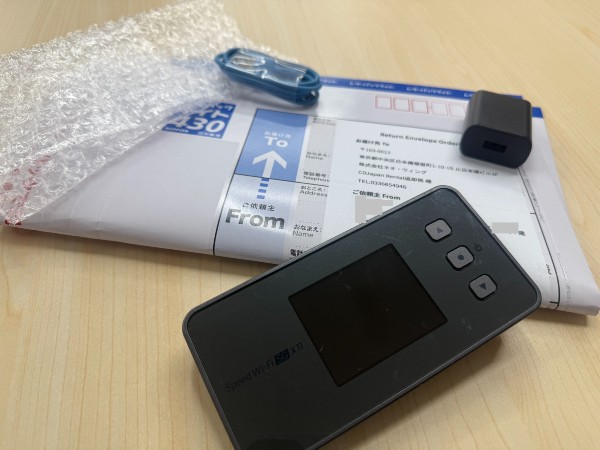
Your rental includes a prepaid return envelope. On your last day, put the router and its accessories in the envelope and drop it into any postbox in Japan. That includes the postboxes inside the airport terminals, the one outside your hotel, and the one on the street corner in a town you happen to be passing through.
- No counter queue on departure day. You are not tied to opening hours, and you do not need to allow extra time at the airport.
- Return anywhere. Fly into Narita and out of Kansai, and the return still works — the envelope does not care which airport you picked it up at, or whether you post it at an airport at all.
- Drop it before security. Most travellers post it on the way to check-in and forget about it.
Airport-specific floor plans and walking directions are on our individual airport guides: Narita, Haneda, Kansai, and the airport pickup overview.
When a pocket WiFi rental from us is not the right choice
There are trips we are not the right fit for. Knowing which yours is beforehand is worth more than any feature list.
You want to decide at the airport, without booking
We cannot help you. Every rental is reserved in advance and shipped to your collection point before you arrive — there is no walk-up rental and no stock held at the counter for same-day requests. If you want to land first and decide later, you need a service that staffs its own counter.
You land late and have not booked delivery
The counters close. If your flight lands after the cut-offs above and you selected airport pickup, you will not get your device that night. This is fixable — but only before you book, by choosing hotel delivery instead.
You are travelling alone with one phone
A router is a second device to charge and carry. If you are solo, on a short trip, and only need data on your phone, an eSIM is less to think about. Our eSIM plans install before you fly and work the moment you land.
You are staying for months, not weeks
Short-term rental pricing stops making sense past a certain point. Students, transferees and residents should look at monthly plans instead: monthly WiMAX or monthly SoftBank.
Corporate and group rentals
Booking twenty routers is not the same task as booking one, and most of the difficulty is logistical rather than technical. We have been handling group orders of this size for several years, including one company that has come back every summer since 2021 to equip a team arriving for one to two months — twenty-plus pocket WiFi units plus a matching number of SIM cards, on the same order.
Here is how it actually works.
-
One shipment, one box, shipping includedWe pack the whole order into a single carton and send it to one address — your Japan office, the hotel hosting the group, or the university department. Nobody has to queue at an airport counter with a list of names, and there is no per-unit shipping charge.
-
The return label is in the boxA prepaid Sagawa waybill ships with the order. At the end of the rental, everything goes back into the same carton, the waybill goes on the outside, and you arrange a pickup. One collection for the entire order — no individual envelopes to distribute, and nobody chasing colleagues for missing devices.
-
Mix devices and SIM cards on one orderGroups rarely want twenty identical things. Some team members need a router to share, others just need data on a company phone. Routers and SIM cards go on the same order, arrive together and are invoiced together.
-
One notification, to one personGroup orders are tracked as a single shipment, so the whole batch has one tracking number and one automatic notification — sent to whoever placed the order, not to twenty individual travellers. Your coordinator knows the devices have arrived; nobody else has to do anything.
-
One to two months is a normal rental length for usLong group rentals are routine rather than an exception. Summer programmes, project teams and seasonal staff are a regular part of our order book, and the operational side is well tested.
-
Ask about a discount for the quantityRates on this page are our standard rates and apply to group orders too. For larger quantities, get in touch and we will look at your numbers — quantity, rental length and device mix — and come back with a quote. There is no minimum order size to ask; if you are not sure whether your order is large enough, it costs nothing to find out.
-
Tell us what your finance team needsDocumentation requirements differ between companies and between countries. Let us know what your accounting side requires and we will confirm what we can issue before you commit to the order.
Contact us about a group order
Include your arrival date, the number of routers and SIM cards, the rental length and the delivery address, and we can usually come back with a quote without a second round of questions.
Frequently asked questions
Which pocket WiFi plan should I choose for a 10-day trip to Japan?
For one or two people doing mostly maps, messaging and social media, the SoftBank 100GB/Month plan at ¥4,864 for 10 days is the best value, and 100GB is well beyond what most travellers use in that time. If you are a group of three or more sharing one router, or you plan to stream video and tether a laptop, take one of the unlimited plans at ¥6,050 for 10 days.
Is CDJapan Rental's unlimited pocket WiFi really unlimited?
The SoftBank Unlimited and WiMAX 5G Unlimited plans have no data cap and no daily threshold. Across more than 10,000 rentals we have not received a speed-restriction report from a customer on normal usage. The separate 100GB/Month plan does have an allowance: past 100GB in a month, speeds are restricted, with a minimum of 256Kbps.
What time do the airport pickup counters close?
Narita Terminals 1 and 2 are open 8:30–20:00 every day. Haneda Terminal 1 is open 9:00–17:00 on weekdays only and closed at weekends and on public holidays. The partner counters at Kansai and Fukuoka are open 7:00–21:00 every day. If your flight lands within 90 minutes of closing, choose hotel delivery instead.
My flight arrives at Haneda Terminal 3. Can I still collect my WiFi at the airport?
Yes, but the post office is in Terminal 1, so you will need the free inter-terminal shuttle or the Tokyo Monorail — allow an extra 15–20 minutes. Note that the counter is closed at weekends and on public holidays, so for a weekend arrival at Haneda, hotel delivery is the only option.
What happens if I forget to pick up my pocket WiFi at the airport?
You will already have received an automatic email with your tracking number and pickup details, sent as soon as the device reached the counter — it is designed to prevent exactly this. If you still miss the counter, we can forward the device to your hotel for a ¥1,000 handling fee, or cancel and refund the order. Forwarding takes a day, so you will be without connectivity in the meantime.
How do I return the pocket WiFi?
Put the router and accessories in the prepaid envelope included with your rental and drop it into any postbox in Japan, including the postboxes inside the airport terminals. There is no counter to visit and no opening hours to work around.
Can I return the device at a different airport from the one I collected it at?
Yes. The prepaid envelope can be posted anywhere in Japan, so arriving at Narita and departing from Kansai — or posting it from your hotel on the morning of departure — is no problem.
Can I rent multiple pocket WiFi units for a company or group trip?
Yes. We regularly handle orders of twenty or more units for one to two months, shipped as a single carton with shipping included and a prepaid Sagawa return waybill in the box. Routers and SIM cards can be combined on one order, and the whole batch is tracked as one shipment with a single notification to your coordinator. There is no minimum quantity to enquire, and for larger orders we can quote a discount against the standard rates.
Want to see how these rates sit against the rest of the market? We keep a separate page for that: see the full price comparison across 10 providers, with survey dates and plan conditions listed for every figure.